
Erstelle Jira-Epic-Vorlagen, kopiere Jira-Vorgänge in ein anderes Projekt und spare wertvolle Zeit.




















We were looking for a plugin to manage our Epics in JIRA and first found the free plugin of the same vendor which is sufficient depending on your use case. However this plugin offers a lot more functions which simplify the cloning a lot. For example it’s possible to change many fields, exclude certain sub-tasks etc. during the process per ticket. Support from the vendor is quick and friendly, thanks for providing the plugin.
This apps now provides the required functionality our organization needs to duplicate epics and all their children. There was a a couple of features missing initially, but after working with their support team, they quickly turned around the additional features we needed which were to duplicate child issues into their originating source project and to expose custom icons. I could not be more pleased with the application’s performance and most of all the kindness, understanding and response to enhancing their product to meet our needs
It’s a very helpful tool for cloning the whole structure – Epics, with selected Stories and Sub-tasks, all together. It simply does the job, without any unexpected issues. Additionally, it has some extra features, like adding prefix or postfix, which helps identifying cloned items. If you clone a lot of items in Jira, then I recommend using the Epic Clone!
Kein Produktmanager, Projektmanager oder Entwickler sollte Jira-Vorgänge einzeln kopieren müssen, um ein neues Projekt zu starten.
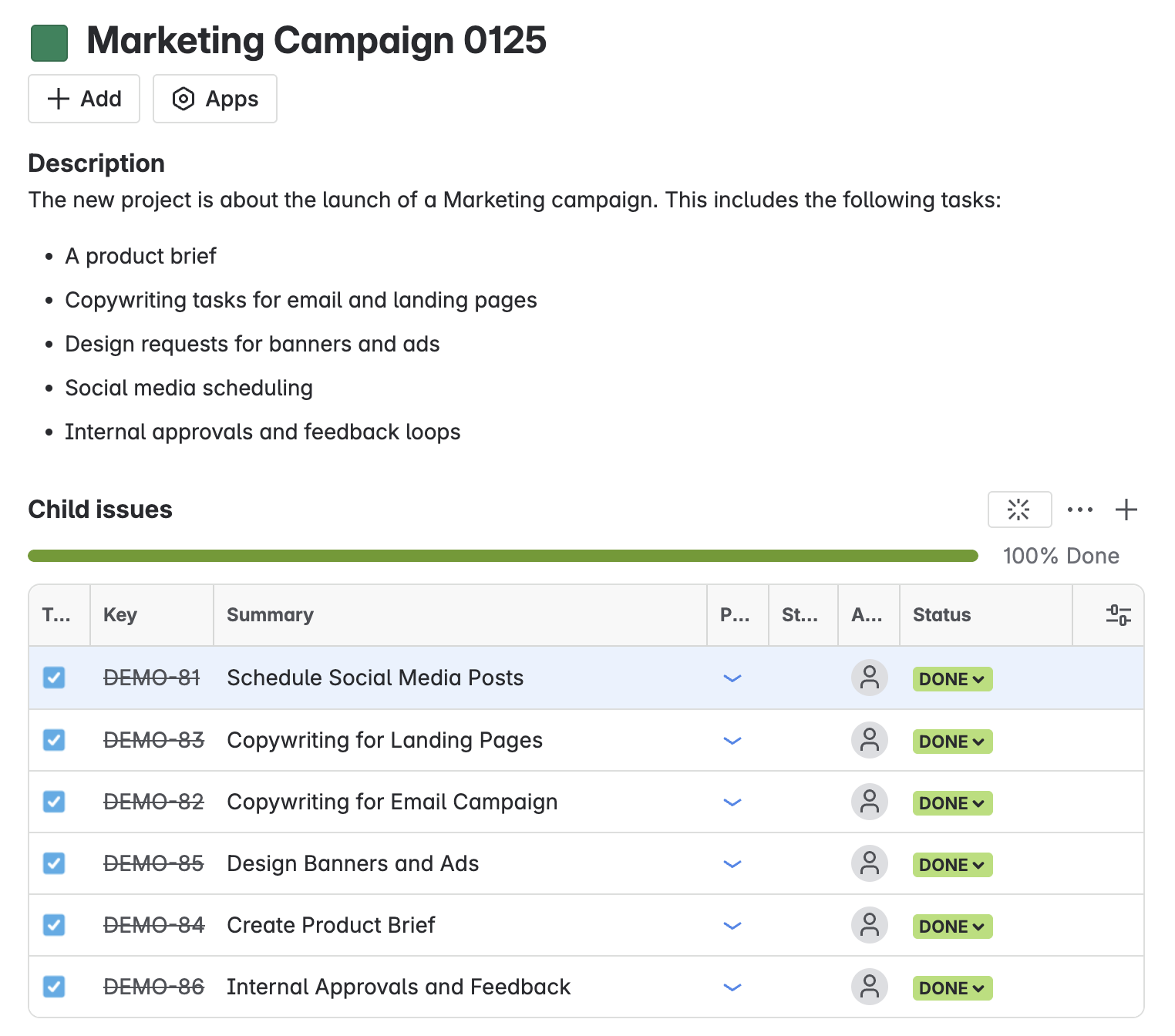
Erstelle ein Jira-Epic-Template mit einer bewährten Vorgangsstruktur (Epic – Vorgang – Sub-Tasks), das du mühelos klonen und je nach Bedarf anpassen kannst.
Bringe Projekte im Handumdrehen zum Laufen, indem du alles Notwendige – einschließlich untergeordneter Vorgänge – projektübergreifend klonst. Passe vor dem Kopieren die Felder des übergeordneten Vorgangs an, um Konsistenz sicherzustellen.


Verschiebe komplette Epics, Stories und Aufgaben projektübergreifend, ohne untergeordnete Vorgänge manuell neu zu verknüpfen. Epic Clone erhält die gesamte Vorgangshierarchie während der Migration – keine Abhängigkeiten gehen verloren, kein Scripting erforderlich.

Als Forge-gehostete App stellt Epic Clone sicher, dass deine Daten die sichere Atlassian-Infrastruktur nie verlassen – und erfüllt damit strengste Compliance- und Datenhaltungsanforderungen.

Wähle das Abonnement, das am besten zu dir passt, und leg direkt los. Zunächst kannst du für 30 Tage unverbindlich testen. Du hast Fragen oder möchtest ein spezielles Angebot? Kontaktiere uns gerne.
Nimm Kontakt mit unserem Team auf und erfahre, wie mühelos Epic Clone Teams dabei hilft, Zeit und Aufwand zu sparen.
Warum Epic Clone die clevere Alternative zum nativen Jira-Klonen ist – mehr Power, weniger Aufwand
Epic Clone is an Atlassian Marketplace app that allows you to clone an epic or any other parent item along with its child issues, sub‑tasks, and optionally linked items—all in one single clone operation. It’s ideal for establishing reusable templates (Epic → Issues → Sub‑Tasks) and quickly replicating them across different projects without manual work
Cloud version: Yes, with Epic Clone you can copy work items of all types. It doesn't have to be an Epic.
DC version: Epic Clone is currently only available in the Epic issue type.
Yes, copying items across projects is possible in both, Cloud and DC version of the app
Yes. Users must have the necessary permissions in the target project to:
Add attachments (if attachments shall be copied)
Assign items (if assignees need to be set)
If you lack these permissions, cloning will fail or options may not appear.
Administrators can limit access to Epic Clone by:
Project scope (e.g. only allow usage from template projects)
Jira user groups (e.g. internal teams only)
This helps ensure consistent practices and avoids accidental cloning by unauthorized users.
Jira’s out-of-the-box clone only duplicates individual issues (epic or story) and doesn’t preserve downward hierarchy levels or relationships.
Epic Clone enables bulk, hierarchical cloning in one single operation.
It offers configuration before cloning (versus automation scripting) and is more flexible than alternatives like Jira Automation, which currently lacks robust support for nested hierarchies
Epic Clone is designed for scenarios where you need to:
Reuse structured epics as templates, including all stories, sub-tasks, and links.
Clone multiple issues (including hierarchy) in a single operation, without having to manually copy each item.
Clone into other projects while customizing fields like summaries, labels, or assignees per use case.
Perform bulk cloning without complex automation rules or scripting.
For teams who frequently build similar work packages (product releases, client projects, onboarding flows), Epic Clone streamlines what would otherwise require multiple manual steps or advanced Jira configuration.
No. Epic Clone works out-of-the-box. It automatically reads your existing field configurations for issues and epics.
There’s no need to build automation rules or scripts. You can, however, customize field mappings or apply find-and-replace actions during the clone process to fine-tune the cloned data as needed.
While Epic Clone doesn’t create new Jira projects itself, it allows you to set up a “template epic” (or a set of epics) in a designated project and then clone them into other projects as needed.
This is often used as a lightweight alternative to Jira’s native project templates, especially for teams who want more flexible control over issue structure and content. Furthermore, project templates populated with work items is an enterprise only feature at the moment.
Epic Clone supports standard Jira system fields as well as custom fields, as long as:
The target project has the same custom fields configured.
The user performing the clone has permission to edit these fields.
For unsupported or unmapped custom fields, Jira’s default values will apply in the cloned issues. You can review and adjust them during or after the cloning process.
As the number of child issues isn't limited in Jira, you can clone as many items at once as are listed in a parent item or the downward hierarchy levels.
No, you don’t need Jira Admin rights to use Epic Clone. Any user with the following can clone:
Create issue permissions in the target project.
Access to view and edit the issues you wish to clone.
Yes! Epic Clone now supports cloning of multi-level work item hierarchies, not just the standard Epic → Story → Sub-task structure. This means you can clone custom issue types, linked tasks, and even deeply nested hierarchies. Whether you’re using advanced portfolio structures or multi-layered project templates, Epic Clone preserves relationships and structure across all hierarchy levels.
Absolutely. The new item navigator module allows you to clone items directly from JQL search results. You can also choose to expand work items to include their child issues, ensuring that your cloned set reflects the full hierarchy found in your search.
The Epic Clone item navigator module lets you start cloning workflows directly from the Jira issue navigator. You can launch the cloning process from any JQL or text-based search, selecting either all search results or specific items. This gives you complete control over which issues to duplicate, without needing to open individual epics.
The module is available to all users with access to the Epic Clone app, depending on your Jira permissions. It integrates seamlessly into the Jira issue navigator, so you can launch cloning operations directly from your usual search interface.
Issue relationships often break during bulk cloning because Jira assigns new issue keys and does not automatically re-map links between cloned issues. This affects dependencies, blockers, and related issues, especially in complex hierarchies.
Yes. Epic Clone automatically preserves and re-maps issue links between cloned issues, ensuring dependencies and relationships remain intact after cloning.
Yes. Unlike CSV export/import, Epic Clone preserves issue hierarchies, links, comments, and attachments. CSV import is suitable for basic duplication but not for maintaining complex Jira structures.
Jira Automation can create issues from templates but struggles with multi-level hierarchies and relationship preservation. Epic Clone integrates with Jira Automation via REST API, combining automation with reliable structure cloning.

Unterteile langfristige Projekte in Phasen für ein besseres Projekt-Tracking in Jira. Ideal für klassisches Projektmanagement, agile Softwareentwicklung und Service-Management-Projekte.

Nicht im Büro? Halte deine Teammitglieder auf dem Laufenden, indem du geplante Abwesenheiten wie Urlaub oder Geschäftsreisen in deinem Jira-Nutzerprofil einträgst – hinterlasse eine Abwesenheitsnotiz oder lasse Tickets automatisch einem Vertreter zuweisen.